
Responsibilities
Conducting interviews, paper and digital wireframing, low and high-fidelity prototyping, conducting usability studies, accounting for accessibility, iterating on designs, determining information architecture and responsive design.
Responsibilities
Conducting interviews, paper and digital wireframing, low and high-fidelity prototyping, conducting usability studies, accounting for accessibility, iterating on designs, determining information architecture and responsive design.
Responsibilities
Conducting interviews, paper and digital wireframing, low and high-fidelity prototyping, conducting usability studies, accounting for accessibility, iterating on designs, determining information architecture and responsive design.
Responsibilities
Conducting interviews, paper and digital wireframing, low and high-fidelity prototyping, conducting usability studies, accounting for accessibility, iterating on designs, determining information architecture and responsive design.
User research: summary
I used news data to amplify knowledge about the impact of the rainy season on the city and to better develop interview questions with users. Most of the participants in the interviews reported that the rainy season has a very intense negative impact on their routines and, as it is a long period (+- 3 months), it generates numerous losses - some minor, others major. Most users feel that the tools available today for tracking risk information are for cars and not for ordinary citizens - who often depend on public transport. The feedback received through the survey made it very clear that users would be open and willing to work to improve the community's routine during the rainy season if they had access to an easy-to-use tool.
User research: summary
I used news data to amplify knowledge about the impact of the rainy season on the city and to better develop interview questions with users. Most of the participants in the interviews reported that the rainy season has a very intense negative impact on their routines and, as it is a long period (+- 3 months), it generates numerous losses - some minor, others major. Most users feel that the tools available today for tracking risk information are for cars and not for ordinary citizens - who often depend on public transport. The feedback received through the survey made it very clear that users would be open and willing to work to improve the community's routine during the rainy season if they had access to an easy-to-use tool.
User research: summary
I used news data to amplify knowledge about the impact of the rainy season on the city and to better develop interview questions with users. Most of the participants in the interviews reported that the rainy season has a very intense negative impact on their routines and, as it is a long period (+- 3 months), it generates numerous losses - some minor, others major. Most users feel that the tools available today for tracking risk information are for cars and not for ordinary citizens - who often depend on public transport. The feedback received through the survey made it very clear that users would be open and willing to work to improve the community's routine during the rainy season if they had access to an easy-to-use tool.
User research: summary
I used news data to amplify knowledge about the impact of the rainy season on the city and to better develop interview questions with users. Most of the participants in the interviews reported that the rainy season has a very intense negative impact on their routines and, as it is a long period (+- 3 months), it generates numerous losses - some minor, others major. Most users feel that the tools available today for tracking risk information are for cars and not for ordinary citizens - who often depend on public transport. The feedback received through the survey made it very clear that users would be open and willing to work to improve the community's routine during the rainy season if they had access to an easy-to-use tool.
PROJECT OVERVIEW
The product
The GreenPoint app is a tool to help people dispose of household waste correctly. There are many people who pollute the environment because they are not aware of the correct destination for their waste, which impacts the entire community. GreenPoint has a system that assists the user in identifying and disposing of waste.
The app's target audience is people who have questions about household waste disposal and would like to help the environment in some way.
Project duration
December 2022 to February 2023


The problem
Incorrect waste disposal has numerous consequences, such as infrastructure problems and flooding, environmental imbalance, water contamination, among other problems that negatively impact the entire community. People have doubts about the correct disposal of each type of garbage. A gap was identified in this area, as there is no specific tool to help with this problem.
The goal
Improve people's awareness of the correct disposal of waste, having more discernment on this matter, thus improving the environment and the community.
My role
UX designer leading the app from conception to delivery.
Responsibilities
Conducting interviews, paper and digital wireframing, low and high-fidelity prototyping, conducting usability studies, accounting for accessibility, iterating on designs and determining information architecture.
User research: summary
I used the information obtained through research on news sites in the region and groups on the subject on facebook to better develop the user interview questions.
During the interviews, most participants reported that they would like to help the environment in some way, but do not know how and are often lazy.
Most participants said that busy lives make it difficult to look for waste disposal information. The feedback received through the survey made it clear that users would be open and willing to use a practical tool to assist with waste management.

Persona 1: Amy

Persona 2: Simon
Competitive audit
An audit of a few competitor's products provided direction on gaps and opportunities to address with the GreenPoint app.


Ideation
I did a quick ideation exercise to come up with ideas for how to address gaps identified in the competitive audit.
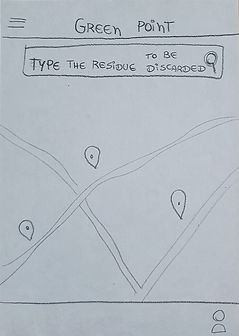
My focus was on disposal awareness, help looking for recycling points or people who work with recycling.

.jpeg)
.jpeg)

.jpeg)
.jpeg)

Digital wireframes
After brainstorming and sketching some paper wireframes, I created the initial designs for the GreenPoint application. The designs were focused on viewing the home screen and scheduling recyclable waste collection.
.png)
Customized page for scheduling recyclable collection
Options for the best days and times to facilitate the side of both types of users - who will donate and what will collect


Low-fidelity prototype
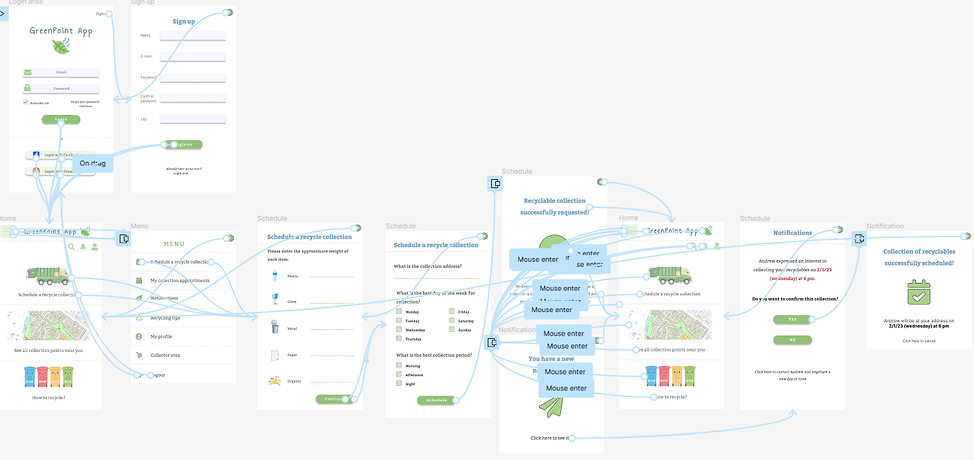
To prepare for usability testing, I created a low-fidelity prototype that connected the user flow of the main feature of the app.

Usability study: parameters
Study type:
Unmoderated usability study
Participants:
5 participants
Location:
Brazil, remote
Length:
15-20 minutes
Usability study: findings
These were the main findings uncovered by the usability study:
1
People are busy and lazy
People are willing to help the environment, however, if they don't have an easy and practical tool, they won't incorporate it into their routines.
2
Home screen
People wish the option to schedule collection was available right away on the homepage.
3
Menu
Most people found the menu too large and confusing, with too many options.
Mockups
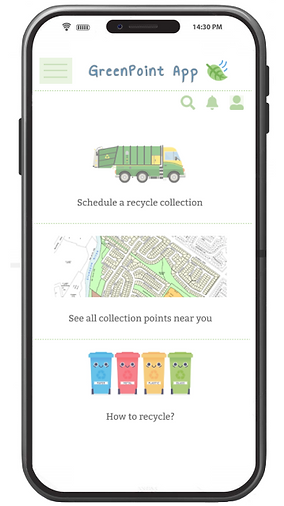
It was necessary to reformulate the main screen, aiming at a better understanding of the app's two main tasks: scheduling a recyclable collection and seeing the collection points close to the user. Since the previous screen was only focused on this last function.
Before usability study
.png)
After usability study

Mockups
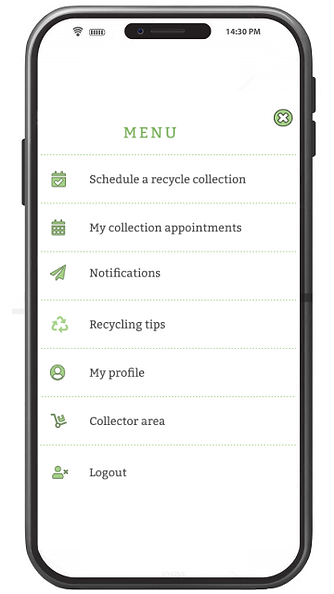
The previous menu caused a cognitive overload for the user, with a very large volume of options and many of them irrelevant at the time. I simplified the menu, and redid it with only the main information that the user needs to complete the tasks.
Before usability study
.png)
After usability study
Mockups
.png)
.png)
.png)
High-fidelity prototype
The high-fidelity prototype followed the same user flow as the low-fidelity prototype, including design changes made after the usability study.
Next steps
1
High-fidelity prototype the entire app, including additional functionality (like information on how to recycle, etc.)
2
Conduct a new usability study after the previous step is completed and assess what would be a possible adherence of users to the app and how likely they would incorporate its use into their routines
3
Talk even more with people in the niche, such as recyclable collection companies and individual collectors, to thoroughly assess their pains and needs to better adapt the app.
Takeaways
Impact
Users said that the app seems to be an "uber of recycling" and that they felt comfortable using this main function during the tests. Most reported that they had never seen any similar tool that encompasses this match function between the person who wants to collect and the person who wants to deliver the recyclables.
What I learned
I learned that even though I had a mental model of how the app would be initially, after conversations with users and tests, I had to change it practically 100% and reinforced what I already knew: we are not the users - you can't neglect test and talk to possible real users of the product, as this is the only way we can deliver products that really solve the problem and not simply mask it.